
How To Create a Payment Item
If you want to create a Payment Item that can be selected as part of a payment requirement for reservations, please follows the steps below.
- 1
- Click on the TablePath logo in the top left.

- 2
- Click on Configure at the bottom left hand side of the page.

PLEASE NOTE: if you're unable to see the 'Configure' link, please see the following: https://help.tablepath.com/article/320-configure-link-missing
- 3
- Click on Payment Items.

Quick Link: To go directly to the 'Payment Items' page, please click here:
- 4
- Select '+ Add New'.

- 5
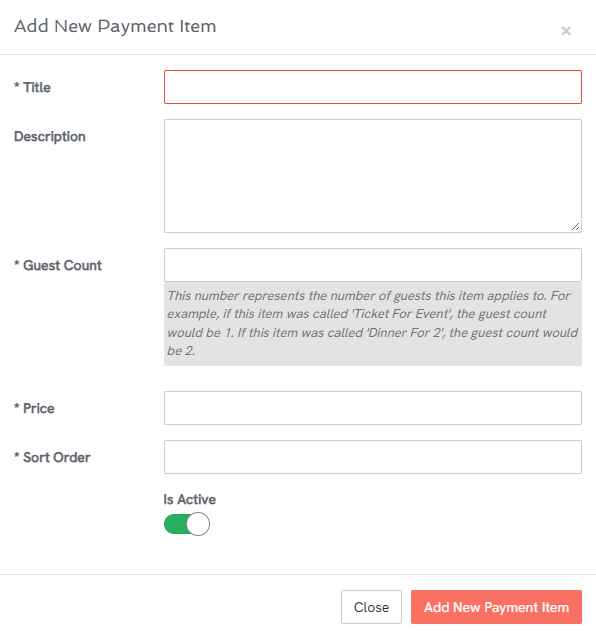
- In the 'Add New Payment Item' pop-up window; fill out the Title, Description (optional), Guest Count and Price.
A note on Guest Count. An item may be applicable to 1 person e.g. a ticket for a Cocktail Evening or it may apply to multiple people e.g. dinner for two or family ticket for 4. When a guest makes a reservation that requires a payment, they must select enough items to cover all of the guests in the booking.
For example, if a Reservation is for 6 people and requires a payment, the following payment items could be selected: 1 x Family of 4 & 2 x individual ticket. (Or perhaps 2 x Family of 4 as the ticket count can exceed the number of guests.)
- 7
- Click 'Add New Payment Item' - to save this product